


We are proud to be the
Unlock One Month Free access to ASI:One Pro and Agentverse Premium
March 21, 2026
California State University Long Beach
Best Use of Fetch.ai - 1st Prize
$300
Cash Prize + Internship Interview Opportunity
Best Use of Fetch.ai - 2nd Prize
$200
Cash Prize + Internship Interview Opportunity
Fetch.ai is your gateway to the agentic economy. It provides a full ecosystem for building, deploying, and discovering AI Agents.
Pillars of the Fetch.ai Ecosystem
Challenge statement
Build and Register AI Agents on Agentverse, discoverable via ASI:One, that turn user intent into real, executable outcomes.
Important links
Examples to get you started:
Code


README.mdTo achieve this, include the following badge in your agent’s
README.md

Video
Quick start example
This file can be run on any platform supporting Python, with the necessary install permissions. This example shows two agents communicating with each other using the uAgent python library.
Try it out on Agentverse ↗
from datetime import datetime
from uuid import uuid4
from uagents.setup import fund_agent_if_low
from uagents_core.contrib.protocols.chat import (
   ChatAcknowledgement,
   ChatMessage,
   EndSessionContent,
   StartSessionContent,
   TextContent,
   chat_protocol_spec,
)


agent = Agent()


# Initialize the chat protocol with the standard chat spec
chat_proto = Protocol(spec=chat_protocol_spec)


# Utility function to wrap plain text into a ChatMessage
def create_text_chat(text: str, end_session: bool = False) -> ChatMessage:
    content = [TextContent(type="text", text=text)]
        return ChatMessage(
        timestamp=datetime.utcnow(),
        msg_id=uuid4(),
        content=content,
        )


# Handle incoming chat messages
@chat_proto.on_message(ChatMessage)
async def handle_message(ctx: Context, sender: str, msg: ChatMessage):
   ctx.logger.info(f"Received message from {sender}")

   # Always send back an acknowledgement when a message is received
   await ctx.send(sender, ChatAcknowledgement(timestamp=datetime.utcnow(), acknowledged_msg_id=msg.msg_id))


   # Process each content item inside the chat message
   for item in msg.content:
       # Marks the start of a chat session
       if isinstance(item, StartSessionContent):
           ctx.logger.info(f"Session started with {sender}")

       # Handles plain text messages (from another agent or ASI:One)
       elif isinstance(item, TextContent):
           ctx.logger.info(f"Text message from {sender}: {item.text}")
           #Add your logic
           # Example: respond with a message describing the result of a completed task
           response_message = create_text_chat("Hello from Agent")
           await ctx.send(sender, response_message)


       # Marks the end of a chat session
       elif isinstance(item, EndSessionContent):
           ctx.logger.info(f"Session ended with {sender}")
       # Catches anything unexpected
       else:
           ctx.logger.info(f"Received unexpected content type from {sender}")


# Handle acknowledgements for messages this agent has sent out
@chat_proto.on_message(ChatAcknowledgement)
async def handle_acknowledgement(ctx: Context, sender: str, msg: ChatAcknowledgement):
   ctx.logger.info(f"Received acknowledgement from {sender} for message {msg.acknowledged_msg_id}")


# Include the chat protocol and publish the manifest to Agentverse
agent.include(chat_proto, publish_manifest=True)


if __name__ == "__main__":
    agent.run()
Agentverse MCP Server
Learn how to deploy your first agent on Agentverse with Claude Desktop in Under 5 Minutes
Agentverse MCP (Full Server)
Client connection URL: https://mcp.agentverse.ai/sse
Agentverse MCP-Lite
Client connection URL: https://mcp-lite.agentverse.ai/mcp


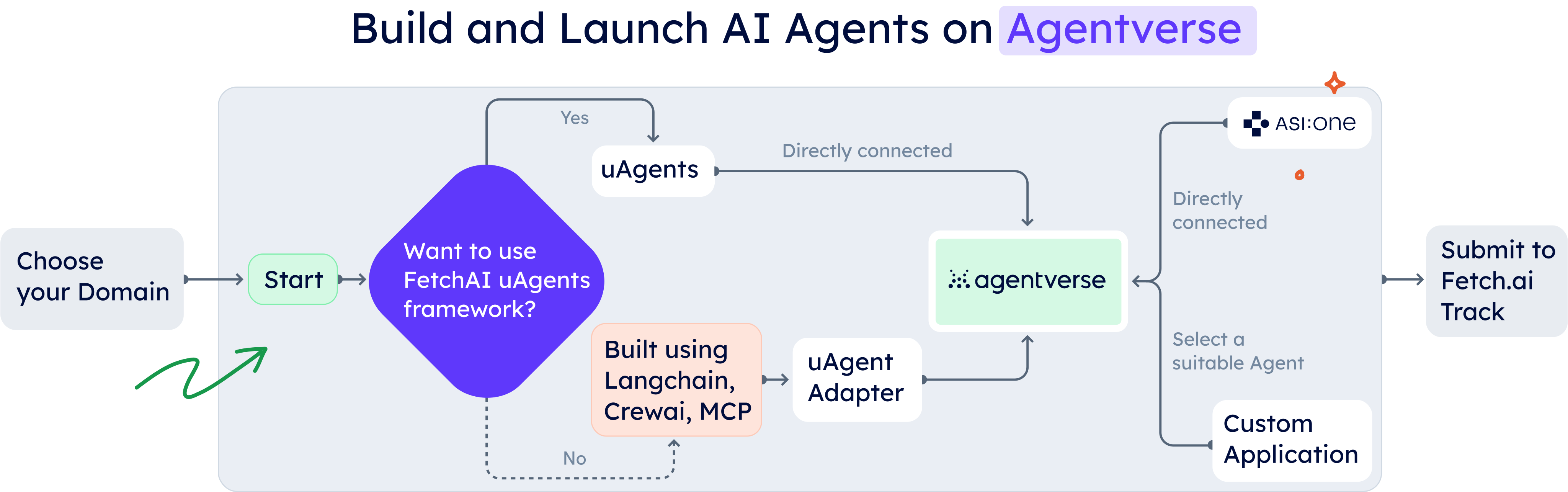
Tool Stack
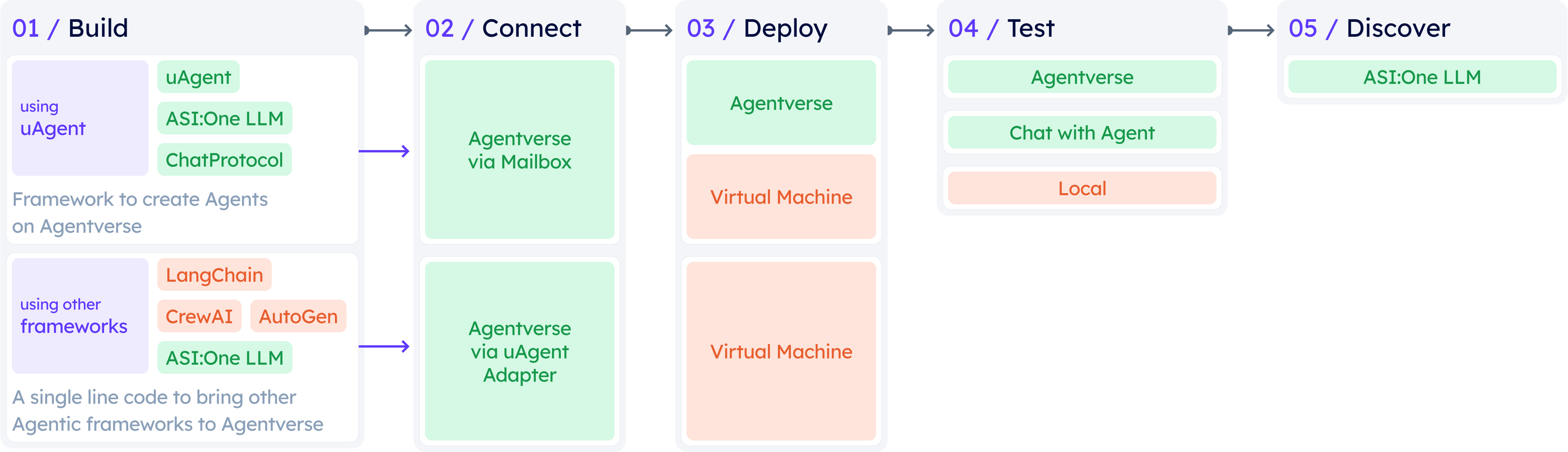
Judging Criteria
Functionality & Technical Implementation (25%)
Use of Fetch.ai Technology (20%)
Innovation & Creativity (20%)
Real-World Impact & Usefulness (20%)
User Experience & Presentation (15%)
Judges

Sana Wajid
Chief Development Officer - Fetch.ai
Senior Vice President - Innovation Lab

Attila Bagoly
Chief AI Officer
Mentors

Abhi Gangani
Developer Advocate

Kshipra Dhame
Developer Advocate

Dev Chauhan
Developer Advocate

Gautam Manak
Developer Advocate

Rajashekar Vennavelli
AI Engineer

Ryan Tran
Junior Software Engineer

Daksha Arvind
Junior Software Engineer
10:00 PDT
Check-In
Pointe, CSULB
11:00 PDT
Opening Ceremony
Pointe, CSULB
12:00 PDT
Hacking Begins
Pointe, CSULB
12:00 PDT
Fetch.ai Workshop
Pointe, CSULB
13:00 PDT
Lunch
Pointe, CSULB
19:00 PDT
Dinner
Pointe, CSULB
10:30 PDT
Venue closed for the night
Pointe, CSULB
08:30 PDT
Venue Re-opens
Pointe, CSULB
11:00 PDT
Breakfast
Pointe, CSULB
11:45 PDT
Submissions Due
Pointe, CSULB
12:00 PDT
Judging Begins
Pointe, CSULB
15:00 PDT
Lunch
Pointe, CSULB
15:30 PDT
Closing Ceremony
Pointe, CSULB
